Wednesday, December 23, 2020

ESP32 i2c_scanner

i2c_scanner in Arduino Playground is a very simple sketch scans the I2C-bus for devices. If a device is found, it is reported to the Arduino serial monitor. It can be run on ESP32 to scan your connected I2C device and print its I2C address.

i2c_scanner

 // --------------------------------------
// i2c_scanner
//
// Version 1
//    This program (or code that looks like it)
//    can be found in many places.
//    For example on the Arduino.cc forum.
//    The original author is not know.
// Version 2, Juni 2012, Using Arduino 1.0.1
//     Adapted to be as simple as possible by Arduino.cc user Krodal
// Version 3, Feb 26  2013
//    V3 by louarnold
// Version 4, March 3, 2013, Using Arduino 1.0.3
//    by Arduino.cc user Krodal.
//    Changes by louarnold removed.
//    Scanning addresses changed from 0...127 to 1...119,
//    according to the i2c scanner by Nick Gammon
//    https://www.gammon.com.au/forum/?id=10896
// Version 5, March 28, 2013
//    As version 4, but address scans now to 127.
//    A sensor seems to use address 120.
// Version 6, November 27, 2015.
//    Added waiting for the Leonardo serial communication.
// 
//
// This sketch tests the standard 7-bit addresses
// Devices with higher bit address might not be seen properly.
//

#include <Wire.h>


void setup()
{
  Wire.begin();

  Serial.begin(9600);
  while (!Serial);             // Leonardo: wait for serial monitor
  Serial.println("\nI2C Scanner");
}


void loop()
{
  byte error, address;
  int nDevices;

  Serial.println("Scanning...");

  nDevices = 0;
  for(address = 1; address < 127; address++ ) 
  {
    // The i2c_scanner uses the return value of
    // the Write.endTransmisstion to see if
    // a device did acknowledge to the address.
    Wire.beginTransmission(address);
    error = Wire.endTransmission();

    if (error == 0)
    {
      Serial.print("I2C device found at address 0x");
      if (address<16) 
        Serial.print("0");
      Serial.print(address,HEX);
      Serial.println("  !");

      nDevices++;
    }
    else if (error==4) 
    {
      Serial.print("Unknown error at address 0x");
      if (address<16) 
        Serial.print("0");
      Serial.println(address,HEX);
    }    
  }
  if (nDevices == 0)
    Serial.println("No I2C devices found\n");
  else
    Serial.println("done\n");

  delay(5000);           // wait 5 seconds for next scan
}


Next: 

Tuesday, December 22, 2020

ESP32 (ESP32-DevKitC-V4) to drive Servo Motors using ESP32Servo lib

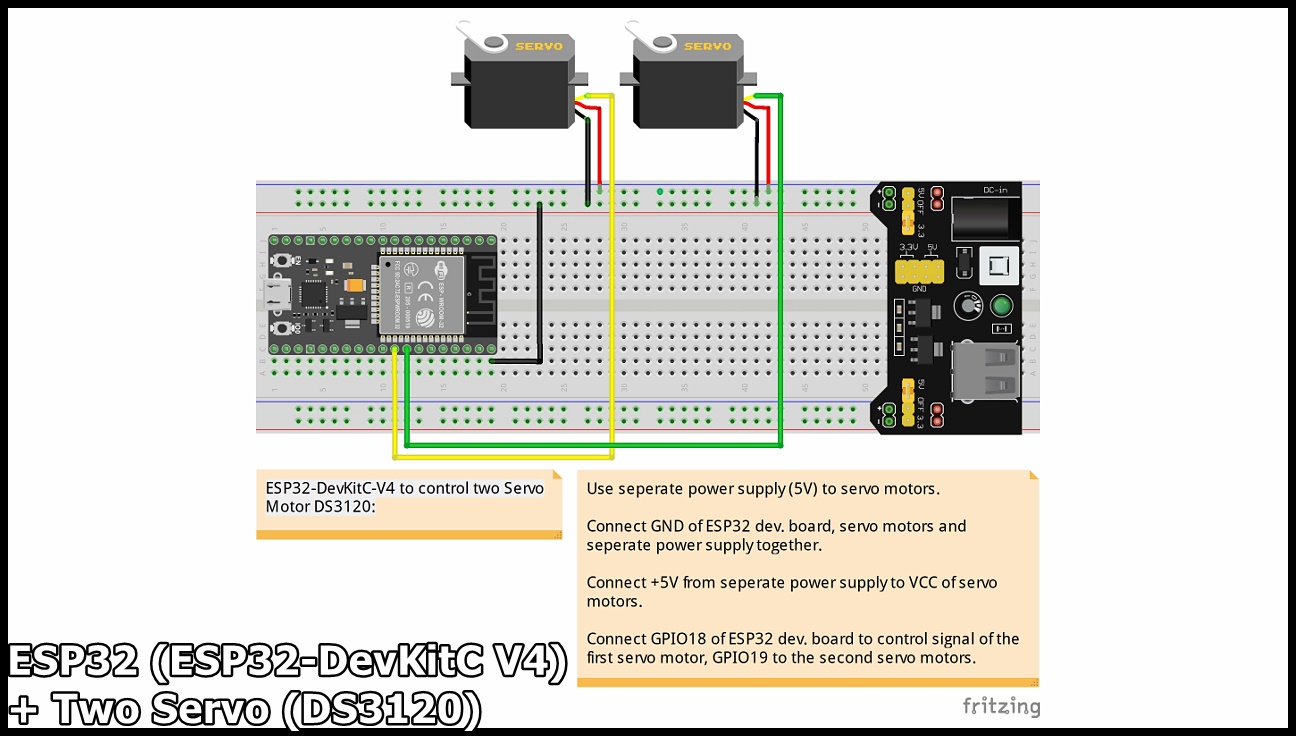
This example show how to program ESP32 (ESP32-DevKitC-V4) to drive Servo Motors (one SG90/two DS3120) using ESP32Servo lib, using ESP32Servo library.

Drive one SG90 Servo Motor:

Connection:

Install ESP32Servo in Arduino IDE's Library manager.

Open example of ESP32Server > Sweep.

As shown in the video, change min/max to 500/2500.

Sweep_esp32_sg90.ino
/* Sweep
Original from ESP32Servo examples Sweep
https://github.com/madhephaestus/ESP32Servo

 */

#include <ESP32Servo.h>

Servo myservo;  // create servo object to control a servo
// 16 servo objects can be created on the ESP32

int pos = 0;    // variable to store the servo position
// Recommended PWM GPIO pins on the ESP32 include 2,4,12-19,21-23,25-27,32-33 
int servoPin = 18;

void setup() {
	// Allow allocation of all timers
	ESP32PWM::allocateTimer(0);
	ESP32PWM::allocateTimer(1);
	ESP32PWM::allocateTimer(2);
	ESP32PWM::allocateTimer(3);
	myservo.setPeriodHertz(50);    // standard 50 hz servo
	myservo.attach(servoPin, 500, 2500); // attaches the servo on pin 18 to the servo object
	// using default min/max of 1000us and 2000us
	// different servos may require different min/max settings
	// for an accurate 0 to 180 sweep
}

void loop() {

	for (pos = 0; pos <= 180; pos += 1) { // goes from 0 degrees to 180 degrees
		// in steps of 1 degree
		myservo.write(pos);    // tell servo to go to position in variable 'pos'
		delay(15);             // waits 15ms for the servo to reach the position
	}
	for (pos = 180; pos >= 0; pos -= 1) { // goes from 180 degrees to 0 degrees
		myservo.write(pos);    // tell servo to go to position in variable 'pos'
		delay(15);             // waits 15ms for the servo to reach the position
	}
}

Drive two DS3120 Servo Motor:

Connection:

modify the code to add one more Servo:

Sweep_esp32_two_ds3120.ino

/* Sweep
Original from ESP32Servo examples Sweep
https://github.com/madhephaestus/ESP32Servo

 */

#include <ESP32Servo.h>

Servo myservo;  // create servo object to control a servo
Servo myservo2;
// 16 servo objects can be created on the ESP32

int pos = 0;    // variable to store the servo position
// Recommended PWM GPIO pins on the ESP32 include 2,4,12-19,21-23,25-27,32-33 
int servoPin = 18;
int servoPin2 = 19;

void setup() {
	// Allow allocation of all timers
	ESP32PWM::allocateTimer(0);
	ESP32PWM::allocateTimer(1);
	ESP32PWM::allocateTimer(2);
	ESP32PWM::allocateTimer(3);
	myservo.setPeriodHertz(50);    // standard 50 hz servo
	myservo.attach(servoPin, 500, 2500); // attaches the servo on pin 18 to the servo object
	myservo2.setPeriodHertz(50);    // standard 50 hz servo
	myservo2.attach(servoPin2, 500, 2500);
	// using default min/max of 1000us and 2000us
	// different servos may require different min/max settings
	// for an accurate 0 to 180 sweep
}

void loop() {

	for (pos = 0; pos <= 180; pos += 1) { // goes from 0 degrees to 180 degrees
		// in steps of 1 degree
		myservo.write(pos);    // tell servo to go to position in variable 'pos'
		myservo2.write(pos);
		delay(15);             // waits 15ms for the servo to reach the position
	}
	for (pos = 180; pos >= 0; pos -= 1) { // goes from 180 degrees to 0 degrees
		myservo.write(pos);    // tell servo to go to position in variable 'pos'
		myservo2.write(pos);
		delay(15);             // waits 15ms for the servo to reach the position
	}
}


Next:

Sunday, December 20, 2020

ESP32: Get chip info

ESP_info.ino, to get chip info of ESP32.
#include <Esp.h>

void setup() {
  Serial.begin(115200);
  Serial.printf("\n\n---Start---\n");
  Serial.print("Chip Revision: ");
  Serial.print(ESP.getChipRevision());
  Serial.printf("\nCpuFreqMHz(): %lu", (unsigned long)ESP.getCpuFreqMHz());
  Serial.printf("\nSdkVersion: %s", ESP.getSdkVersion());
  Serial.printf("\nFlashChipSize: %lu", (unsigned long)ESP.getFlashChipSize());
}

void loop() {
  
}

Run on ESP32-DevKitC V4 with ESP32-WROVER-E module: